Reviewing submissions
The approval queue, bulk export, and the cadence that keeps fans submitting.
Image and text quests cannot be verified by a machine, so a person has to look at them.
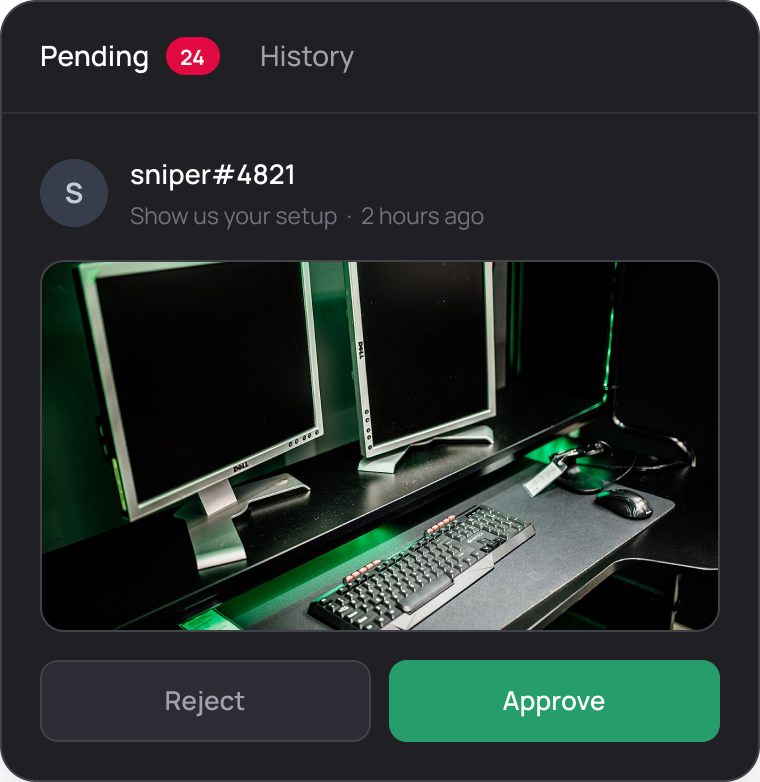
The queue
Two tabs. Pending holds everything waiting on a decision, with the count next to the tab name. History holds every decision already made, so you can check what was approved and by whom.
Open a submission to see the image or the text, the fan who sent it, and the quest it belongs to.
Approving is permanent. The reward pays out immediately and there is no undo. Read the submission before you press it, and be careful with the keyboard when you are working through a long queue.
The fan's view
While a submission waits, the quest card shows Pending review. The fan knows it arrived and knows nothing was paid yet.
Rejecting lets you leave feedback, and the fan can submit again. Use it. "Rejected" on its own reads as a judgement on the fan; "the photo needs to show the whole jersey" reads as an instruction, and it usually comes back correct.
Bulk export
Download every submission on a quest in one go: a zip of the images and text files, plus a CSV listing who submitted what.
The CSV carries the fan id, their handle and the submission, and files are named after the quest and the handle, so a folder of two hundred entries is still sortable.
This is how you run a design contest or a photo campaign without opening two hundred cards one at a time. Export, judge offline with the people who need to judge, then come back and approve.
Cadence
- Decide who reviews and when, before you publish the quest.
- Review at the same time every day. A fixed slot, morning or midday, is enough. Fans learn when decisions happen and stop refreshing.
- Assign a second reviewer for campaigns. Anything you promoted will produce more submissions in a day than the rest of the board does in a month.
A slow queue is the fastest way to make fans stop submitting. A design contest with a two week turnaround on approvals reads as a broken quest, and the fans who gave you real work are the ones who notice first. If you cannot review within a day, do not publish the quest yet.
Submission templates and their fields are in Submission quests.